Yappr vs Wispr Flow, and twelve other ways to talk to your Mac
There are a lot of ways to talk to your computer, and the marketing pages mostly say the same four things. The differences that survive contact are narrower and more boring than the pages suggest: where the audio is turned into text, what happens to it afterwards, and whether anything useful is done with the words once they exist.
The table
Every cell below came from the vendor’s own page, not a review site. Where a vendor does not say something, the cell says “Unverified” rather than a guess — and there are more of those than you would expect, including on the question that matters most.
These twelve are the real comparison set: hold a key, speak, and the text lands at your cursor in whatever app you were already in.
| Tool | Platforms | Price | Transcription | Does anything with the text |
|---|---|---|---|---|
| YapprFounding price for the first 500; $20/mo after | macOS | Free · $15/mo ($150/yr) | On device | Shapes prompts, rewrites selections, knows your project |
| Wispr FlowVendor: transcription always in the cloud | macOS, Windows, iOS, Android | Free · $15/mo ($12 annual) | Cloud | Cleans up, formats per app, rewrites selections |
| VoiceInkLocal by default; open source | macOS (Apple silicon), iOS | $49–69 once | Either | Cleans up, rewrites selections, dictionary |
| Superwhisper | macOS, Windows, iOS | $8.49/mo · $84.99/yr · $249.99 once | Either | Mode system, transforms selections |
| MacWhisperOne-time, not a subscription | macOS | Free · €64 once | Either | Grammar, custom prompts, summaries |
| Willow VoiceCloud default, optional offline mode | macOS, Windows, iOS | Free · $15/mo ($12 annual) | Either | Cleans up, formats per app, rewrites selections |
| Aqua VoiceVendor: cloud-based, needs a connection | macOS, Windows, iOS | Free · $10/mo · $30/mo Max | Cloud | Cleans up, rewrites selections |
| OpenWhisprExplicit no-training policy | macOS, Windows, Linux, iOS | Free · $6.67/mo annual | Either | Voice instructions, learns your words |
| SpokenlyLocal models free forever | macOS, Windows, Linux, iOS | Free local · $8.33/mo annual | Either | AI modes, dictionary, replacements |
| WhisperingOpen source, bring your own key | macOS, Windows, Linux, web | Free · you pay providers | Either | Optional polish step |
| HandyOpen source, no cloud path at all | macOS, Windows, Linux | Free | On device | None — transcription only |
| Talon VoiceVendor states no processing location | macOS, Windows, Linux (X11) | Free download · Patreon beta | Unverified | Scripting, not cleanup |
Checked 6 September 2026. Prices and platform support move — if you spot something out of date here, it is a mistake rather than a position, and we will fix it.
There is a second group, and if you are reading this you probably already have one of them: the dictation built into the AI tools themselves. Claude Code has shipped /voice since March. VS Code has its own, running a speech model on your machine. Cursor put one in the agent box. All free.
| Tool | Platforms | Price | Transcription | Does anything with the text |
|---|---|---|---|---|
| Claude Code /voiceVendor: audio is not processed locally · 20 languages · stops at 15s silence or 2 min · needs a Claude.ai account, not an API key | Claude Code CLI, its VS Code extension, agent view | Free with a Claude plan | Cloud | Transcription only; no cleanup pass |
| VS Code dictationOn device by default · Apple silicon or Windows/Linux · optional cloud cleanup step, can be turned off | VS Code only — editor, chat, commit box | Free; no Copilot plan required | On device | Punctuation and lists; does not restructure |
| CursorVendor states no processing location · shipped in 2.0, October 2025, no voice changes in the changelog since | Cursor's agent prompt box only | With Cursor | Unverified | Transcription only |
| Claude DesktopCaps Lock shortcut, off by default | macOS 14+, Quick Entry only | With Claude | Cloud | Transcription only |
Checked 13 September 2026. Prices and platform support move — if you spot something out of date here, it is a mistake rather than a position, and we will fix it.
They are good, and two things are true of every one of them.None leaves the app that ships it — the moment you move to Slack, Linear, a pull-request description or an email, you are typing again. And none of them restructures; they write down what you said. Claude Code’s is the sharpest of the set and even adds your project name and git branch as recognition hints, but it runs no cleanup pass at all: the transcript is what lands.
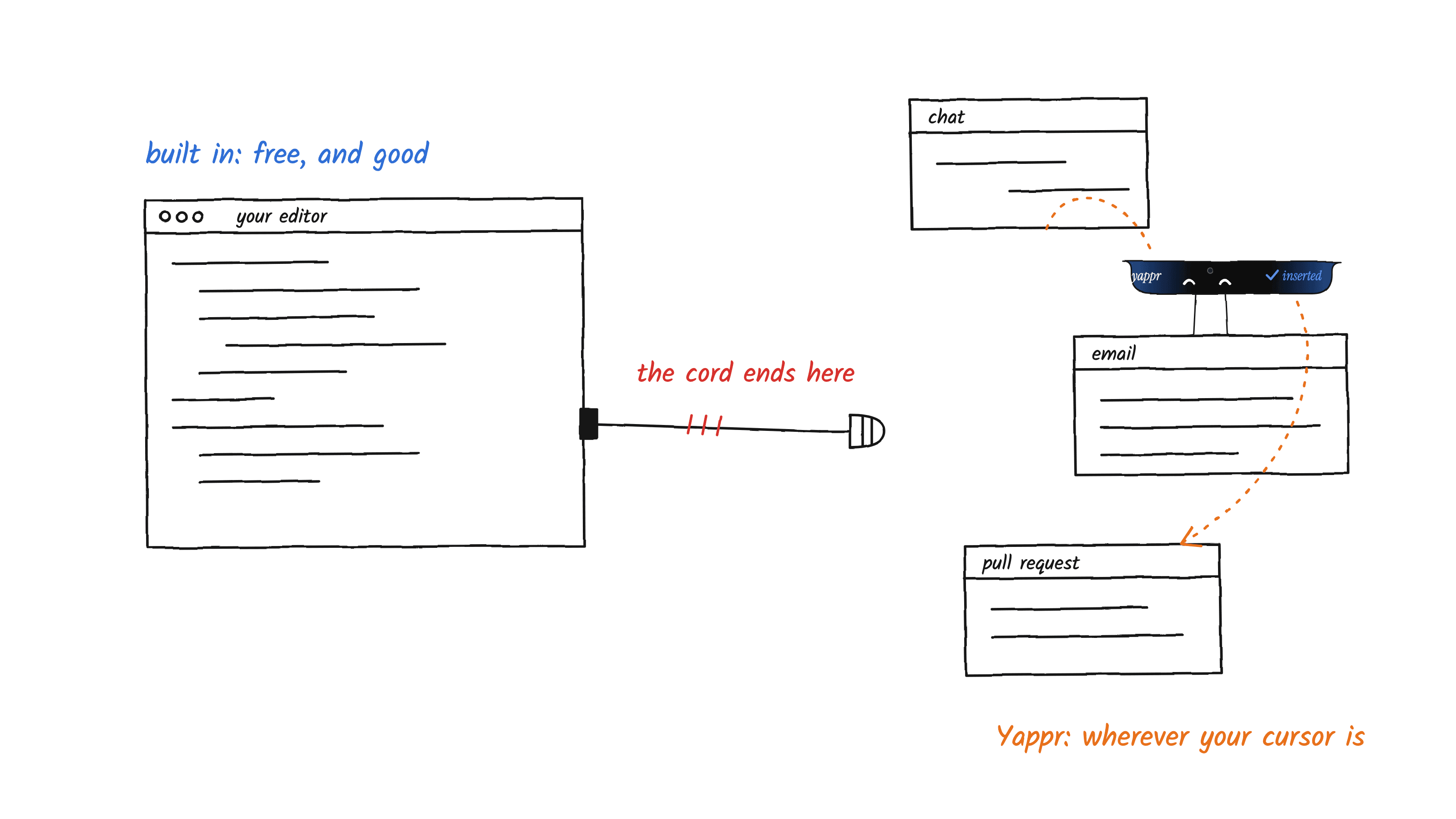
That is the honest shape of the choice. If you dictate short prompts into one tool and nowhere else, the free option is genuinely enough, and we would rather say so than pretend otherwise. What you are paying us for is the other twenty apps, and the part where a ramble comes out as a brief.
A third group gets mentioned in the same breath but is a different shape again — meeting notetakers, editing suites, and the dictation already built into your operating system. Leaving them out would read as ducking the comparison, so:
| Tool | Platforms | Price | Transcription | Does anything with the text |
|---|---|---|---|---|
| Apple DictationOn-device only for supported languages | macOS, iOS | Free with the OS | Either | Raw transcription |
| Windows Voice Access | Windows 11 22H2+ | With Windows | On device | Raw transcription and commands |
| Otter.aiPolicy: trains on de-identified audio and transcripts | macOS, Windows, web, iOS, Android | Free · $16.99/mo ($8.33 annual) | Cloud | Summaries and chat, meeting-shaped |
| Descript | macOS, Windows, web | Free · from $24/mo ($16 annual) | Cloud | Editing suite, typed AI prompts |
| Whisper MemosMemo app; audio goes to a third party | iOS, macOS, watchOS | $9.99/mo · $69.99/yr | Cloud | Summaries, custom prompts |
| Google Docs Voice TypingGoogle says the browser decides | Chrome, Edge, Safari | Free with a Google account | Unverified | Raw transcription, formatting commands |
| DragonNo current Mac product | Windows | Not published | Unverified | Commands and formatting |
Checked 6 September 2026. Prices and platform support move — if you spot something out of date here, it is a mistake rather than a position, and we will fix it.
The one difference that is not marketing
“Private” is a word every tool in that table uses. It means at least three different things, so it is worth replacing with a question that has a factual answer: where does the audio get turned into text?
On-device means the recording is processed by your own machine and never transmitted. Cloud means the audio is uploaded. That is not a scandal — it is how most of these work, it is why they can be so accurate, and it is usually disclosed. But it is a real difference, and it is the one that does not come down to trusting a policy.
Wispr Flow is unusually straight about this. Their own documentation says: “Transcription always occurs on the cloud. This is the best way for us to provide accurate, low latency transcription.” That is a defensible engineering trade and they state it plainly, which is more than several others manage.
Yappr made the other trade: transcription runs on your Mac. That is a fact about where the work happens, not a privacy claim — see below for why we have stopped making those.
Where Yappr sits in that column
Since this table was written by one of the products in it, the honest thing is to state our own row flatly rather than sell it.
Transcription runs on your Mac. The resulting text is then sent to a third-party service to be cleaned up and shaped — that is the step that turns a ramble into a structured prompt, and it is not something a laptop does well yet.
We are not going to make a privacy claim on top of that. We do not operate the service that processes the text, we cannot audit it, and a promise about somebody else’s infrastructure is not ours to make. What we send, and what we know about how it is handled, is written down in the privacy policy rather than compressed into a marketing line.
How to read the privacy pages
Two patterns are worth knowing about before you take any homepage at its word, ours included.
- Privacy as a paid feature. More than one tool advertises zero data retention prominently, and then lists it on the pricing page as a business-tier line item. If retention is a plan feature, it is not the default on the plan you are on.
- Blanket claims that predate the cloud option. A privacy policy saying no data leaves your device, on a product that also ships optional cloud model providers, cannot be true in both modes. It usually means the policy was written before the feature and never revisited.
- Explicit training language.Some are direct about it. Otter’s policy, effective June 2026, says it uses information to improve services “including training our proprietary AI technology on de-identified audio recordings and on transcriptions (which may contain Personal Information)”. That is clear, it is disclosed, and you should know it before dictating anything confidential into it.
Platforms, plainly
Yappr runs on macOS. Windows and Linux are not supported today. We would rather say that than imply a beta you cannot join. If you are on Windows, several tools in the table above will serve you now, and Wispr Flow and Superwhisper are the obvious places to start.
The half nobody compares: what happens to the words
Most of the table transcribes. Some of it cleans up. Very little of it does anything with the shape of what you said, which is the part that matters if you are talking to a coding agent rather than writing a note.
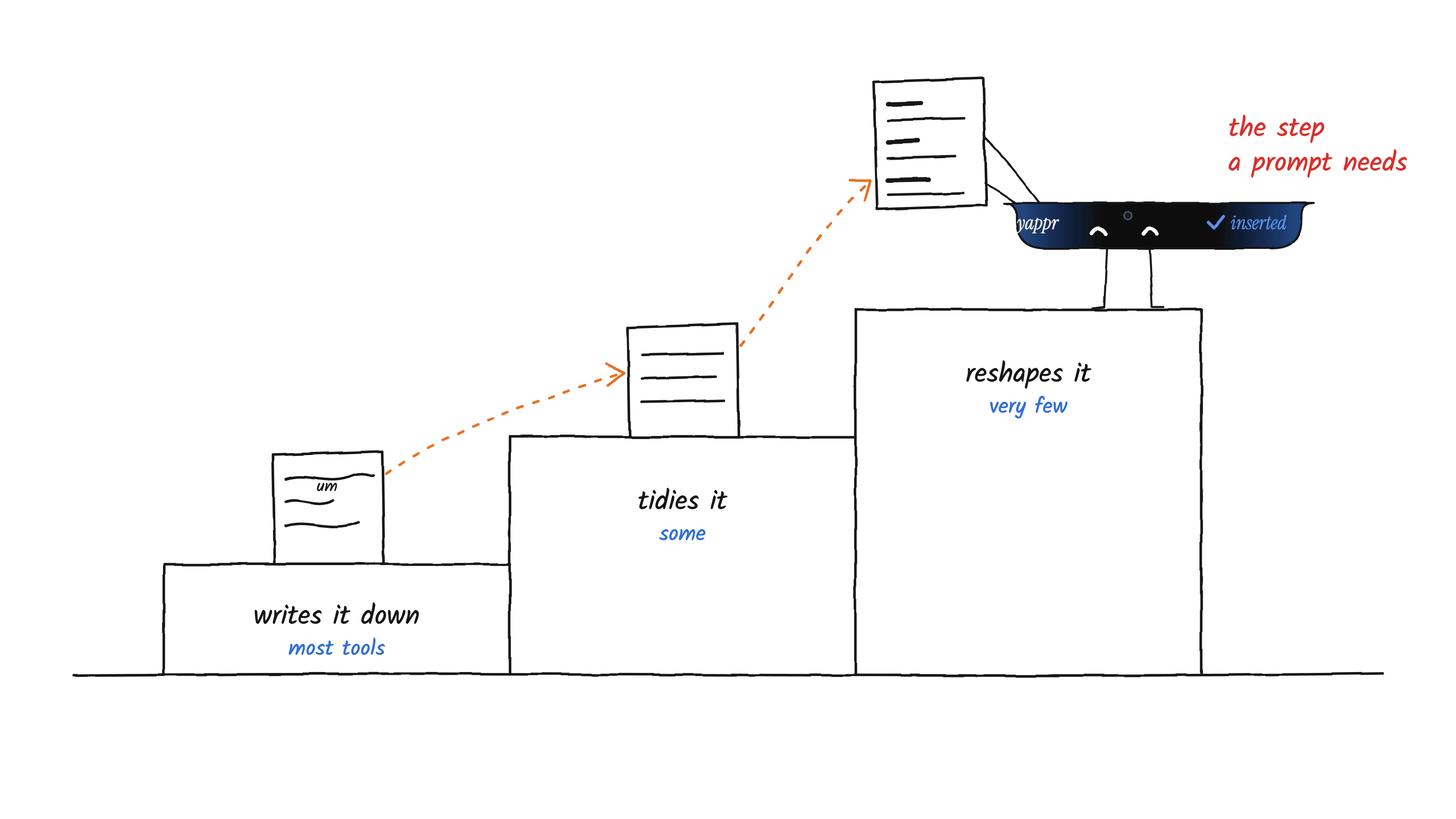
A dictated request arrives as one breath: the goal, the context, a retraction halfway through, and the constraint you remembered last. Left alone, that is a bad prompt — not because the transcription was wrong but because speech has no headings. Yappr files it into Goal, Context, Constraints and Tasks — plus Verify when you said how you would check it — keeps every detail you spoke, and adds nothing you did not.
Select-and-rewrite is not ours alone, and it would be misleading to imply otherwise: Wispr Flow has Command Mode, Willow has Scribe, Aqua has Edit Mode, and Superwhisper’s Super Mode transforms a selection. Four of the tools above will let you highlight something and say the change.
Persistent memory is likewise not unique — several of these keep a custom dictionary that learns your names and jargon, and some keep saved snippets. The distinction worth drawing is narrower than “they have no memory”, because that is not true. They remember your vocabulary. What we have not found an equivalent of is memory of the project: tell Yappr what you are building, once, and every dictation is read against it — which component you meant, how your own names and tools are spelled, what “the notch” is. Those facts are not pasted into a coding agent’s prompt; it has the repository, and being told what it already knows costs tokens and attention. Yappr never adds to that memory on its own: what is in it is what you put there.